There are two ways to insert a YouTube video into the body of a story. The easiest method is to utilize the YouTube Button on the Text Editor.
Clicking on this button  , will bring up the following action window:
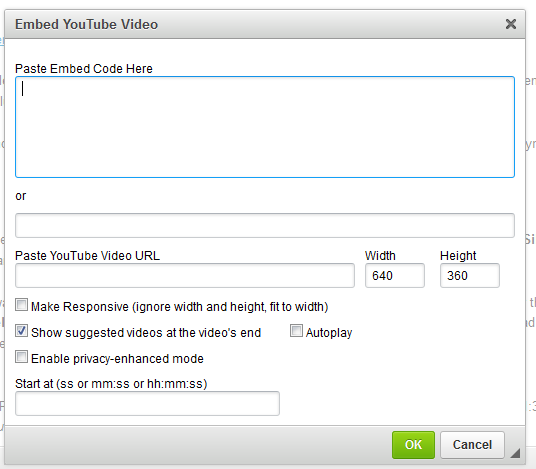
There are two options inside this window for adding the YouTube video.
1. You can paste the full Embed Code into the first box, labeled as such.
or
2. You can paste the link for the video into the field titled as such and then setup the size of the window, add the title and utilize the other options like auto-play and picking a time where the video should begin.
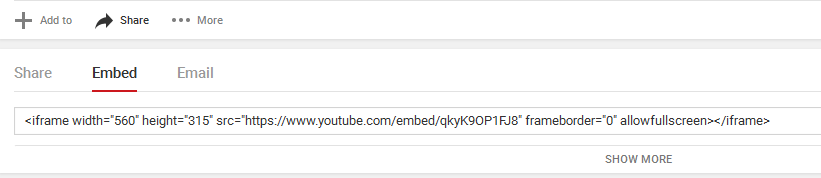
The second method would be inserting embed code directly into the source code in the editor. This would be done by first grabbing the embed code from YouTube. Go to the video, click the Share button and then embed and copy the code as seen in the example below:
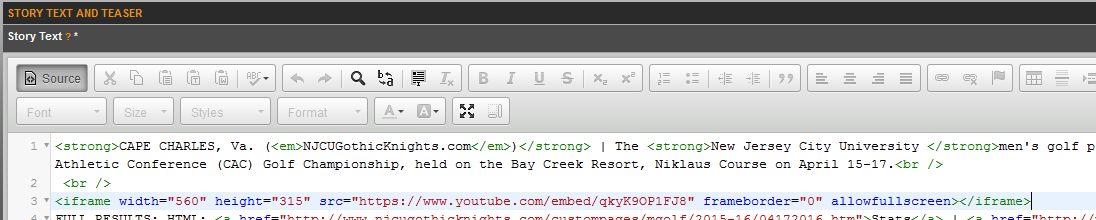
The next step would be to enter the source area on the editor. This is done by clicking on the source button  which will bring up the source and then search through to find the location you want to insert this video to, and use control+V on the keyboard to paste it.
Was this article helpful?
That’s Great!
Thank you for your feedback
Sorry! We couldn't be helpful
Thank you for your feedback
Feedback sent
We appreciate your effort and will try to fix the article