Overview
Using deep linking, the mobile application will provide the ability to jump to specific areas within the app. Whether the link was accessed from within the app or outside of it, the user will be redirected to the correct SIDEARM NextGen app and relevant page.
Setting up deep links in Airship
Using the URL scheming found below, you can choose which deep links you want to have available when sending out messages through Airship.
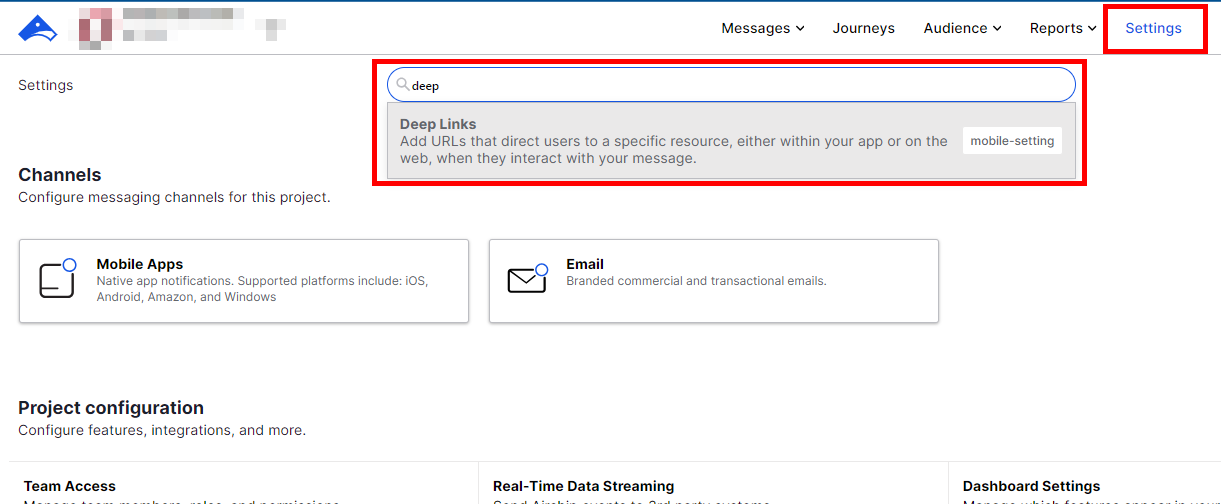
Once you've decided which deep links you want, go to Settings in Airship and search for "Deep Links".
Click on "New Deep Link".

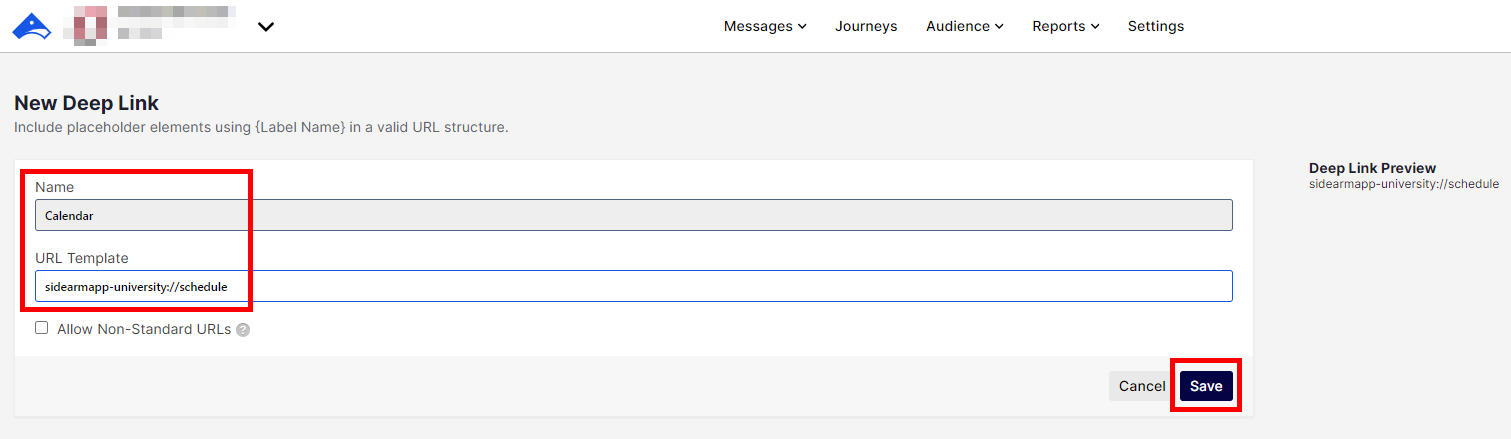
Add you deep link and click "Save".
URL Scheming
Each unique SIDEARM app will have URL scheme that will begin with the following market:
sidearm-<shortkey>://
Home:
Opens app to home screen.
sidearm-<shortkey>://home
Example: sidearmapp-ugeorgia://home
Composite Schedule:
Opens the main schedule located on the bottom row navigation of the home screen.
sidearmapp-<shortkey>://schedule
Example: sidearmapp-ugeorgia://schedule
Media:
Opens the main media screen located on the bottom row navigation of the home screen. May contain sections that attribute to a specific media_type or content_type (or both).
Open app to Media screen =>sidearmapp-<shortkey>://media
Example: sidearmapp-ugeorgia://media
May not exist: Dependent upon media being broken out into audio/video tabs.
Open app to Media/Audio screen => sidearmapp-<shortkey>://media/audio
Example: sidearmapp-ugeorgia://media/audio
Open app to Media/Video screen => sidearmapp-<shortkey>://media/video
Example: sidearmapp-ugeorgia://media/video
Open app to Media/YouTube screen => sidearmapp-<shortkey>://media/youtube (if exists in app)
Example: sidearmapp-ugeorgia://media/youtube
Open app to Media Category screen => sidearmapp-<shortkey>://media/category/{category number}
Example: sidearmapp-ugeorgia://media/category/5 (for "Features")
Open app to specific video => sidearmapp-<shortkey>://media/{media id}
Example: sidearmapp-ugeorgia://media/{media id}
Open app to specific audio file => sidearmapp-<shortkey>://media/{media id}
Example: sidearmapp-ugeorgia://media/{media id}
Open Live Event
Video: sidearmapp-<shortkey>://media/video/0/{media ID}
Audio: sidearmapp-ugeorgia://media/audio/0/{media ID}
Examples: sidearmapp-ugeorgia://media/video/0/4412, sidearmapp-ugeorgia://media/audio/0/4412
More Menu:
Opens the More menu located on the bottom row navigation of the home screen.
sidearmapp-<shortkey>://more
Example: sidearmapp-ugeorgia://more
Stories:
Opens app to a specific story.
sidearmapp-<shortkey>://news/{story id}
Example: sidearmapp-ugeorgia://news/{story id}
Sportfiles:
Opens app to a specific sportfile.
sidearmapp-<shortkey>://sportfile/{sportfile id}
Example: sidearmapp-ugeorgia://sportfile/{sportfile id}
Teams:
Open app to a specific sport home screen => sidearmapp-<shortkey>://sport/{sport id}
Example: sidearmapp-ugeorgia://sport/{sport id}
Open app to a specific sport roster => sidearmapp-<shortkey>://sport/{sport id}/roster/{roster id}
Example: sidearmapp-ugeorgia://sport/{sport id}/roster/{roster id}
Integrations:
Opens app to one of the partners SIDEARM integrates with if that integration is contained within in the app.
Open app to the Cue Audio screen => sidearmapp-<shortkey>://cue-audio
Example: sidearmapp-okstate://cue-audio
Open app to the FanMaker screen => sidearmapp-<shortkey>://fanmaker
Example: sidearmapp-houston://fanmaker
Open app to the VenueNext screen => sidearmapp-<shortkey>://venuenext/{instanceId}/{type}
Example: sidearmapp-wisconsin://venuenext/{instanceId}/{type}
InstanceId is not stored anywhere in the CMS for the app to retrieve it from. Needs to inputted into the deep link structure manually.
Open app to the Paciolan screen => sidearmapp-<shortkey>://paciolan
Example: sidearmapp-ugeorgia://paciolan
Open app to the Paciolan Manage screen => sidearmapp-<shortkey>://paciolan/manage
Example: sidearmapp-ugeorgia://paciolan/manage
Open app to the Paciolan Purchase screen => sidearmapp-<shortkey>://paciolan/purchase
Example: sidearmapp-ugeorgia://paciolan/purchase
Open app to the Ticketmaster screen => sidearmapp-<shortkey>://tmpsdk
Example: sidearmapp-nku://tmpsdk
Was this article helpful?
That’s Great!
Thank you for your feedback
Sorry! We couldn't be helpful
Thank you for your feedback
Feedback sent
We appreciate your effort and will try to fix the article