To create a new story, expand Stories in the SIDEARM menu and select Add New Story. Once in the Add/Edit Sport Stories area, you will see five tabs labeled Details, Story Text / Teaser, Primary Image, Associations / Rankings and Finish. The first step in this process is Details, see below for an explanation of each field in this tab.
Note: The * denotes a required category.
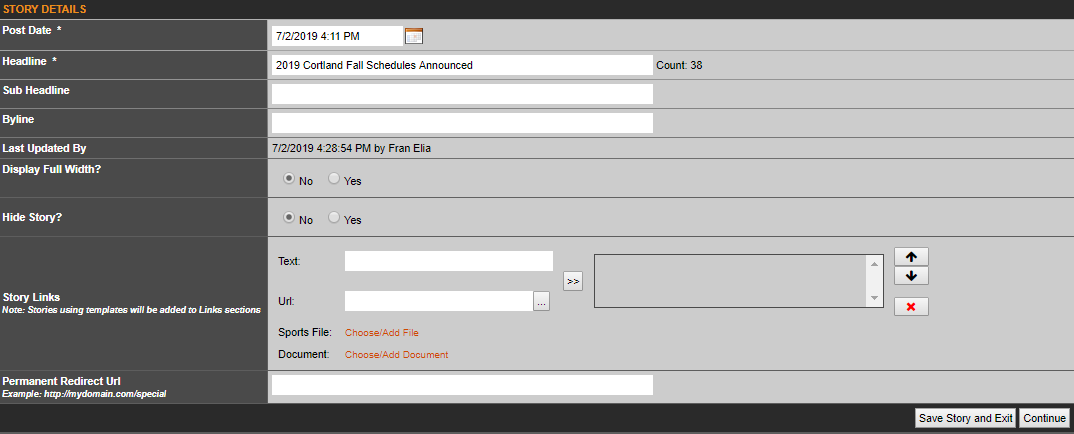
Post Date: The current date and time will automatically be added into this line. However, you can edit this content to both pre and post date a story. If you are entering old stories and which to have the correct date reflected, simply enter that information in the [MM/DD/YYYY HH:MM:SS am/pm]. If you want to post date a story, enter a future date or a future time and then the story will be "hidden" until the site's click hits that date/time.
Headline: Either paste or type in your stories headline in this box.
Sub Headline: Although not required, if used, this will show up under the headline on the story page only.
Byline: If you wish to give credit to the individual writing the story, you a can enter their information here, typically in the format of By: First Last.
Last Updated By: Will show the last admin that made an adjustment to the story.
Display Full Width: This will default to Yes and simply means the story will show on the full width of your design. If set to no, depending on your site design, could show the right column of the main index page.
Hide Story?: As most items on SIDEARM, you can hide a story. This is most often used as a way to write a story during a game, and be able to save it, but not have it show live on the site.
Story Links: Gives you the ability to add site color themed links to the top of the stories. A good chunk of our clients use these for PDF box scores, highlights, post-game press conferences, games notes, photo galleries and much more.
Permanent Redirect URL: This is not a custom story URL field. It is used to add a story title and primary image into the story rotator, but the URL entered will direct users to a separate page instead of the story itself.
Was this article helpful?
That’s Great!
Thank you for your feedback
Sorry! We couldn't be helpful
Thank you for your feedback
Feedback sent
We appreciate your effort and will try to fix the article