To upload an XML box score in SIDEARM, go to the schedule for that sport and then click on 'Results' button for the event. In the next screen, click on the browse button, locate the file on your computer and choose your file. You'll be brought back to the Results screen where you can click Upload XML.
NOTE: For NCAA clients that push to the NCAA, check the box to the right and then click upload.
You will notice the option that says "In this file, we are the:" with home and away . When you mark a game as home or away in the schedule, these options will default to that settings. However, if it is a neutral site game, then be sure to check whether you are the home or away team in the game file and set the correct button prior to upload.
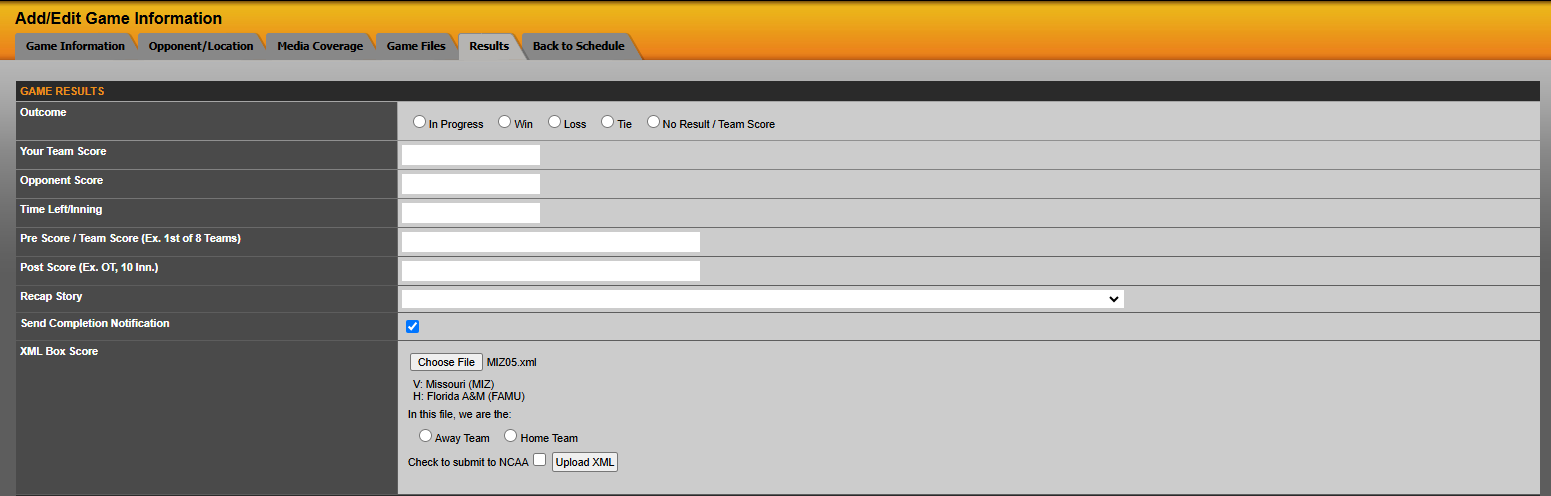
Note: If the option to submit a box score to the NCAA is not present, then go to Site Settings > Settings > XML Stats. Once there, XML Stats - 6 has three empty fields. One to enter your NCAA Organization ID, another to enter your NCAA Orgazation Password and one to enter NCAA Football Division. This is the login you would use to gain access to the NCAA Stats site.
Was this article helpful?
That’s Great!
Thank you for your feedback
Sorry! We couldn't be helpful
Thank you for your feedback
Feedback sent
We appreciate your effort and will try to fix the article