To adjust the rankings of the stories, click on Adjust Rankings under the Stories bullet in the sidebar. This will bring you to the Story Ranking Management page.
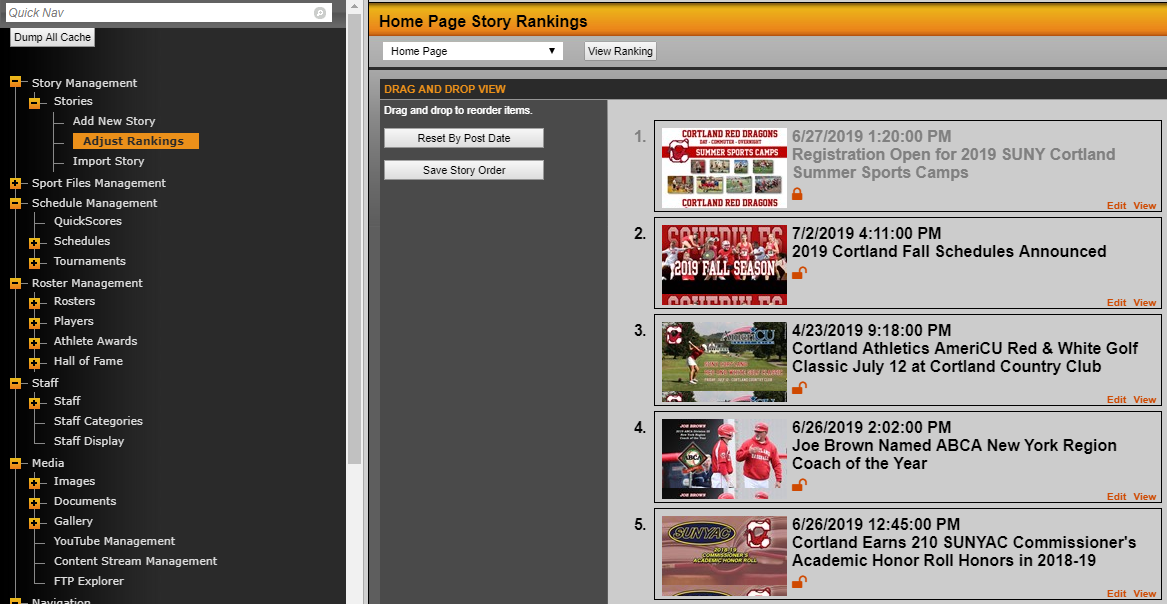
Select a web page from the drop-down list in the top pane and click on view ranking. The story rankings for that page would load in the bottom pane of the window. To re-order the ranking of a story, click on the story and drag it to a position of your choice. You can do change the ranking of all the stories as there is no limit to it. You can also reset the story rankings according to their post date by clicking on the Reset By Post Date button on the lower left window.
Was this article helpful?
That’s Great!
Thank you for your feedback
Sorry! We couldn't be helpful
Thank you for your feedback
Feedback sent
We appreciate your effort and will try to fix the article