An optional element for the Watch+ layout is the ability to place a hero slider at the top of the page. This section could be one static image, or contain multiple that will slide through at a predefined interval. The hero promo can highlight anything you choose, with some examples being primary sponsors or a graphic linked to outside content.
Note: 1440x360 pixels is a popular size for this area.
Step 1: General Configuration
The first step to setting up a hero promo is to adjust basic settings of whether it will be used and if it will be one or multiple slides.

Hero Display: Choose between hide or show hero.
How Many Slides: Choose between one or many.
If choosing many, you can also define how many seconds the panels will display before sliding to the next one.
Step 2: Slide Configuration / Adding a Slide
The second step of the process is adding a slide and setting up the order.

The above section allows you to add slides to the list, edit a slide to configure it, adjust the order via drag and drop and clear all if needed.
Step 3: Edit Slide
Whether you are editing an existing one or looking to setup a new one, this process requires you to click edit (pencil icon) to move into the next screen.
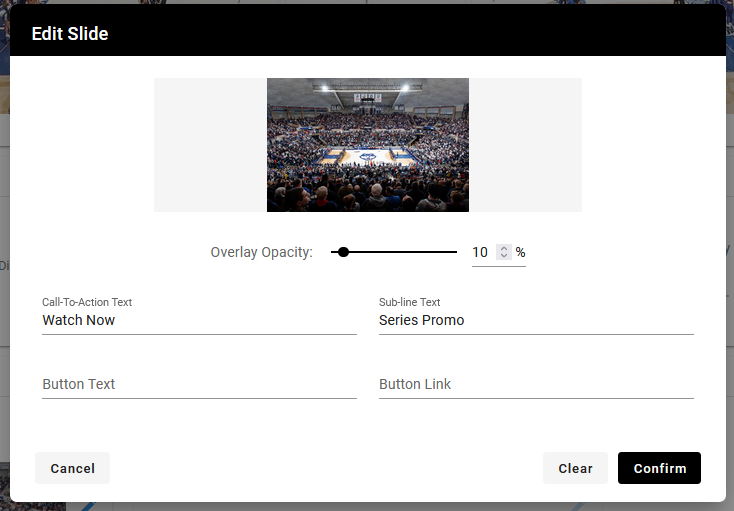
Choose Image: Click on the top area to choose your image.
Overlay Opacity: Adjusts the transparency of the overlay that appears on the image. This can help make the text stand out more.
Call-to-Action Text: Treat this similar to a “headline”, will be the first line of text.
Sub-line Text: treat this similar to a sub-headline, will be appear in smaller text below the call-to-action.
Button Text: If you would like a button to be displayed, enter the text for it here.
Button Link: If you entered text for the button, paste a link on where it should go.
Was this article helpful?
That’s Great!
Thank you for your feedback
Sorry! We couldn't be helpful
Thank you for your feedback
Feedback sent
We appreciate your effort and will try to fix the article