This menu allows admins to create specific groups and assign to a specific set of users. Groups can be customized in terms of number of tickets available, whether tickets can be transferred or not, limited to specific schedules, etc. -
- Transfer Tickets: Users in this group can transfer tickets to each other
- Add Guests: Users in this group can add guests to their account on the frontend
- Requires Compliance: Ticket requests from users in this group will be placed in the 'compliance ticket requests' tab on the backend, therefore need to be approved before tickets can be picked up by guests
- Home/Away/Special Tickets: The number of tickets available for each user to request for each of those types of games
When editing or adding a user group -
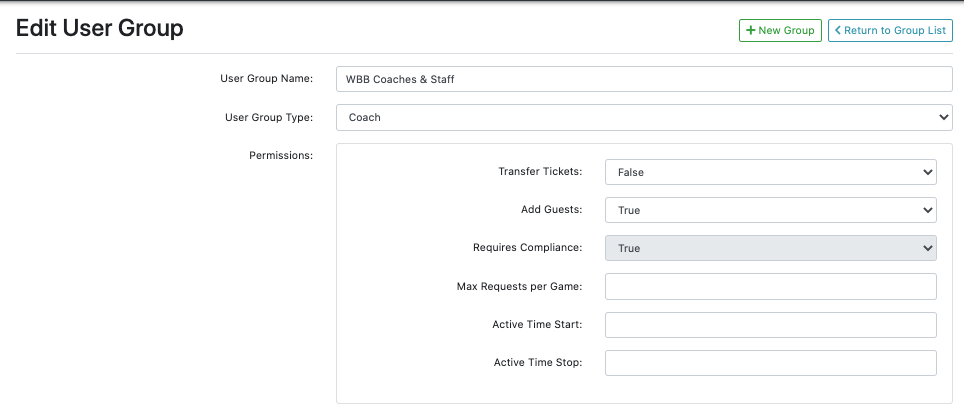
- Transfer Tickets: Users in this group can transfer tickets to each other
- Add Guests: Users in this group can add guests to their account on the frontend
- Requires Compliance: Ticket requests from users in this group will be placed in the 'compliance ticket requests' tab on the backend, therefore need to be approved before tickets can be picked up by guests
- Max Requests Per Game: The maximum amount of ticket requests a single user in this group can request These requests can include both the user's tickets, as well as tickets transferred to that user
- Active Time Start and Stop: Time of day when ticket requests for this group can be be submitted
- Ex. - 8am-5pm
- This means that tickets can only be submitted between that time period on the days when the game is active/available for ticket requests
- Ex. - 8am-5pm
Was this article helpful?
That’s Great!
Thank you for your feedback
Sorry! We couldn't be helpful
Thank you for your feedback
Feedback sent
We appreciate your effort and will try to fix the article