When creating signee rosters and/or adding players to your Signing Day page, there are some suggestions the SIDEARM team would like to pass along.
There are two ways to set up your signing day roster (For NextGen sites specifically, the roster needs to be active (not set to hidden) in order for the player bios to be accessible, so please utilize option 2):
1. Create a roster and keep it marked as HIDDEN -

This will keep the roster hidden from the frontend completely, but still allow each individual player to display on the Signing Day page.
2. Create a roster, and mark each individual player HIDDEN
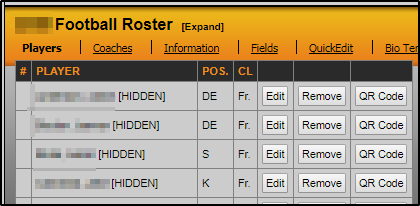
When each individual player is announced, edit the player in the roster on the backend, and change the HIDDEN notation back to 'no' -
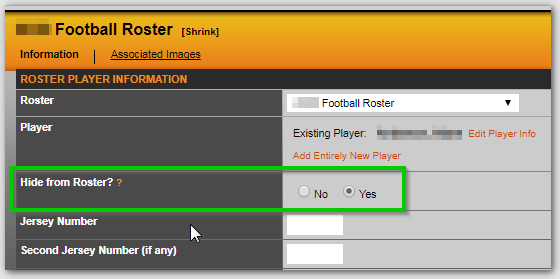
This will allow the roster to be visible on the front end, but players will not be visible.
For the roster season, this should be the opposite of the actual CURRENT roster season is set to. So for a fall sport, rather than the 2025 season, this should be assigned to 2025-26
For winter sports, rather than 2024-25, this should be set to 2025.
You'll also want to make sure the signing day roster setting for 'is official roster?' is set to 'no' -

--------------------------------------------------------------------------------------------
For the fields listed in 'table view' of the Signee Roster section, the following fields will display -

The 'time' field will be filled in as the time is added to each player on the backend. To add this, go to rosters>edit roster>edit player>select player bio data button>update time>save, then also edit and re-save the signing day page.

Was this article helpful?
That’s Great!
Thank you for your feedback
Sorry! We couldn't be helpful
Thank you for your feedback
Feedback sent
We appreciate your effort and will try to fix the article