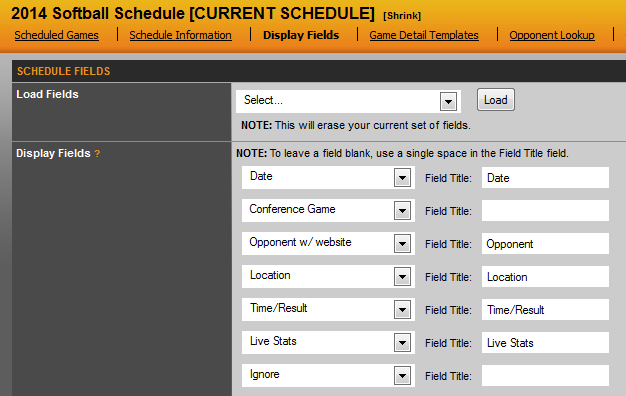
When adding a new schedule, you will need to setup the display fields that the schedule will show on the front end of the site. This tab allows you to fully customize what you want to appear. As shown in the screen shot below, the standard fields are Date, Conference Game, Opponent w/ Website, Location and Time/Result. These options are select from the dropdown menus on the left of the page. After choosing one, a default title will appear to the right, however this title is editable. So you can change Conference Game to your Conference abbreviation or put a space to have nothing appear. Another common option is to have Opponent changed to Event for sports like Track & Field.
If you wanted to change the order or add other options, view the list and choose the ones you wish to display. When finished, scroll to the bottom and hit the Update Fields button.
Was this article helpful?
That’s Great!
Thank you for your feedback
Sorry! We couldn't be helpful
Thank you for your feedback
Feedback sent
We appreciate your effort and will try to fix the article