Using NCAA LiveStats from Genius Sports gives you the ability to send your live stats to SIDEARM without an XML file!
This is available for all sports currently available on NCAA LiveStats from Genius Sports.
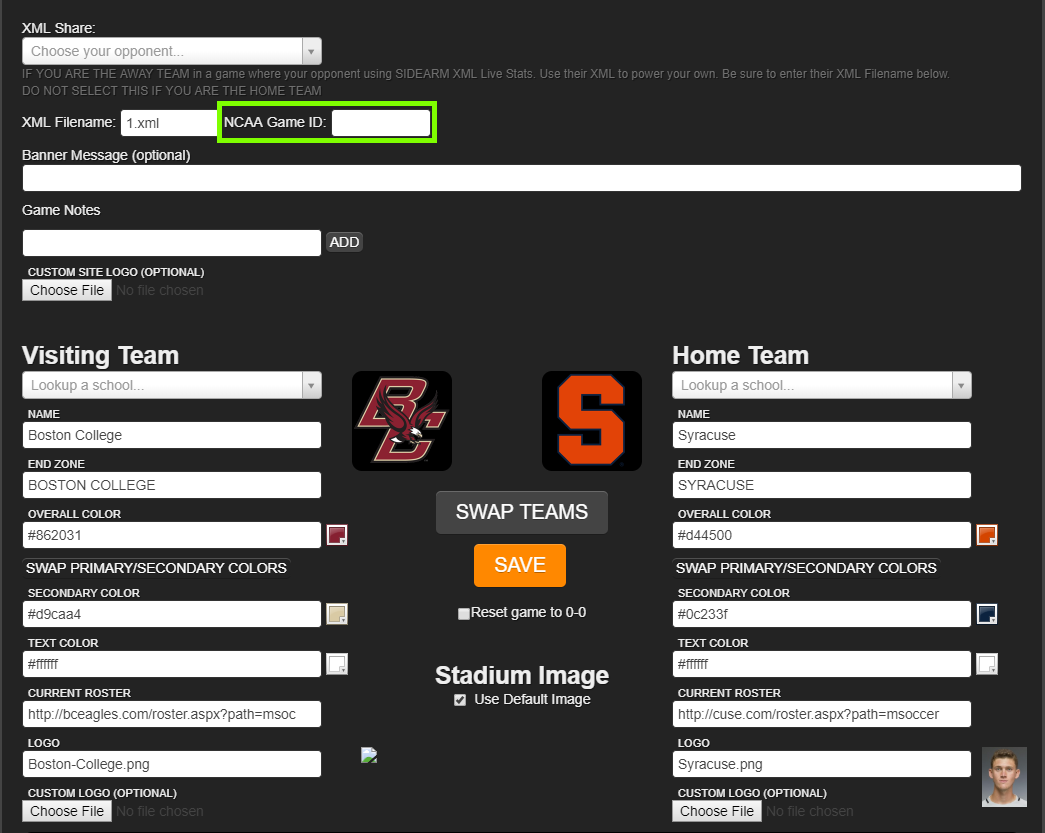
To enable the connection between NCAA LiveStats from Genius Sports and SIDEARM log into the admin side of your site, go to Live Stats and click Control for the sport you're setting up. There you can enter the NCAA LiveStats GameID into the control page before saving.
To find the NCAA Game ID ahead of time you can follow the options found HERE!
If you're about to start the game, you can quickly find the Game ID using the following process:
In the NCAA LiveStats application, the user can see the GameID by going to HELP>Game Information. That will display the GameID that should be entered on the SIDEARM live stats Control page.
Entering the GameID creates a connection between SIDEARM and NCAA LiveStats from Genius Sports that will allow you to skip the FTP transfer of the XML file that's been necessary in the past!
Was this article helpful?
That’s Great!
Thank you for your feedback
Sorry! We couldn't be helpful
Thank you for your feedback
Feedback sent
We appreciate your effort and will try to fix the article