Shipping
Sellers can add as many shipping methods to the site as they’d like.
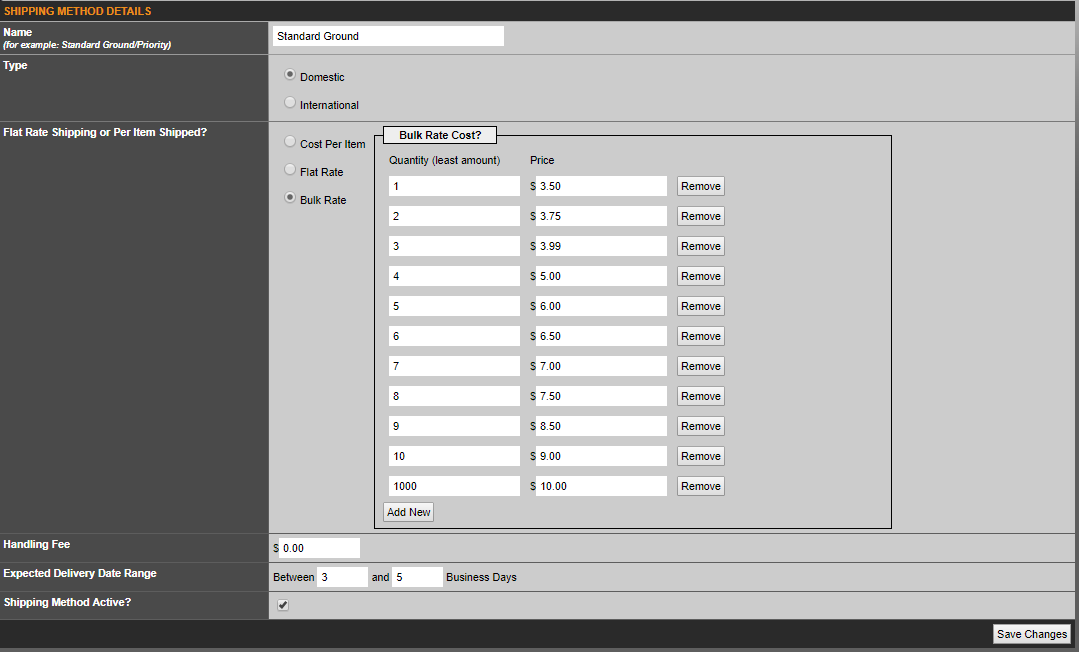
Go to Auctions >Shipping > Add New Shipping Method. Shipping options will be entered on a per product basis. When a user checks out, they will pick shipping information for each product, as opposed to the entire order.
· Name – A shipping method must have a name; for example “Standard Ground”.
· Type – Domestic/International: Depending on the user’s shipping address, the shipping methods available may change.
· Flat Rate, Per Item Shipped or Bulk Rate – Sellers can select whether a shipping method has a flat rate, a cost per the number of items, or a bulk rate option, which allows the buy to select multiple of the same item, and tailor the shipping accordingly.
· Handling Fee – A handling fee will be added to the total shipping cost.
· Expected Delivery Range – An estimated time range of how soon the buyer can expect delivery of an order.
· Shipping Method Active – Whether to list this shipping option to a buyer or not.
Was this article helpful?
That’s Great!
Thank you for your feedback
Sorry! We couldn't be helpful
Thank you for your feedback
Feedback sent
We appreciate your effort and will try to fix the article