The Import Subscribers option will allow you to batch import subscribers using an Excel sheet. The excel sheet can be kept very simplistic by having fields for first name, last name and e-mail. Once the file has been compiled, go to Subscribers>Import Subscribers and click the Choose File button to find the Excel file on your computer.
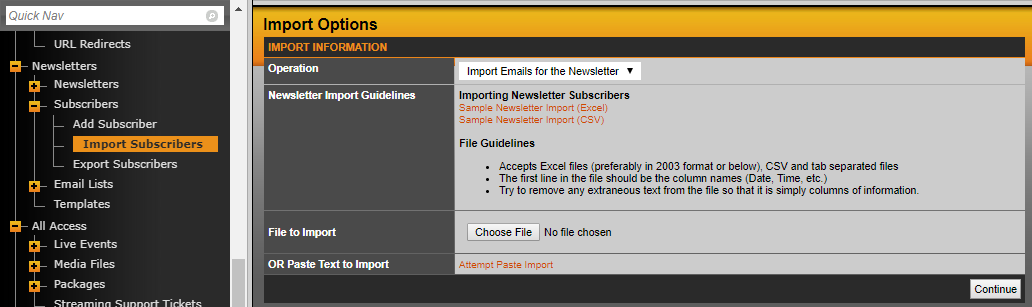
In the next screen, it will list a drop-down that says Sheet1 (or whatever you renamed the Excel sheets to). This is just confirming you want to import from the first sheet in the file, so hit continue again.
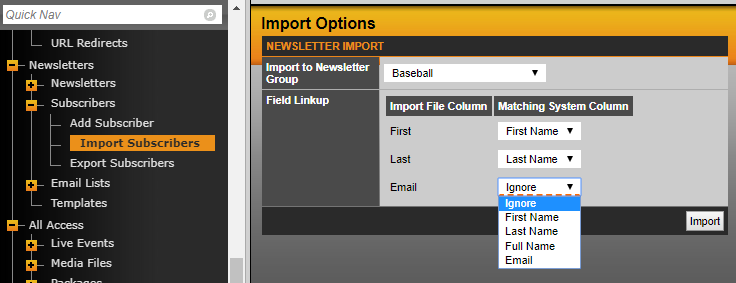
The final step will present you with the option to choose the e-mail list you want to import these subscribers into and then you need to match the fields from the file with the options in SIDEARM. So for this example First with First name, Last with Last Name and Email with Email. Then when ready, click on import.
HELPFUL TIP: Create your Email Lists before you import subscribers. It's much easier to import subscribers directly into an existing Email List during the import process then to manually do that after the fact.
Was this article helpful?
That’s Great!
Thank you for your feedback
Sorry! We couldn't be helpful
Thank you for your feedback
Feedback sent
We appreciate your effort and will try to fix the article