At the bottom of creating an award, you will the Award Phase area. Here you can add dates for when nominations and voting are to open/close or can manually choose a phase for the award.
If you wish to manually adjust the phases, choose on to start here by clicking the checkbox. Then you can adjust a phase from the awards management area by clicking on and choosing the next option: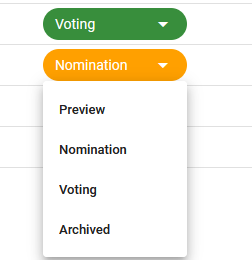
However, the voting platform also offers the ability to have these phases shift automatically. In order for this work properly be sure to follow the steps below.
Do not click any of the phase options and instead leave these blank:
Enter a start date and time for nomination to open and close, along with voting (when applicable).

Then you will just need to save the award and leave it be. As each date/time is reached, it will shift to the appropriate phase automatically.
Note: If at any point during this process you adjust a phase manually, the auto-shifting will no longer work.
Was this article helpful?
That’s Great!
Thank you for your feedback
Sorry! We couldn't be helpful
Thank you for your feedback
Feedback sent
We appreciate your effort and will try to fix the article