What is Needed:
-Personal Facebook Page
-Personal Instagram Page
-Business Facebook and Instagram Page (a separate Facebook page is needed for each sport that you want to connect in the admin)
Connect your Business Facebook page to an Instagram Business Account
First step in this process is to make sure each Instagram account that you plan on displaying is set to be a Business Account that is then linked to a Facebook page that is also a business account.
How to determine if the accounts are set as a Business Account.
For Instagram:
-Log into Instagram and look for the 3 horizontal lines that opens a menu. Within the menu, click on “Account Types and Tools”.
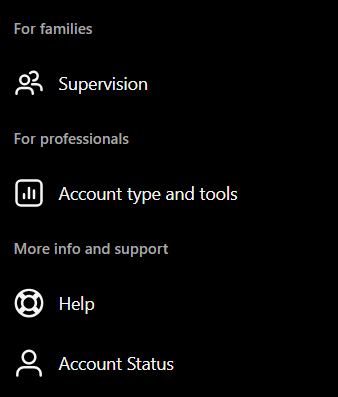
Once the user clicks on Account Type and Tools, they should have an option to “Switch to Professional Account”. Follow the next few steps to complete the process of switching your account to a Professional Account.
Connect your Facebook Page and Instagram account:
- Log into Facebook, then click your profile photo in the top right.
- Click See all profiles, then select the Page you want to switch into.
- Click your Page's profile picture in the top right of Facebook.
- Click Settings & privacy, then click Settings.
- Under Permissions, click Linked accounts.
- Next to Instagram, click View.
- Click Connect account, then follow the steps to connect your Facebook Page and Instagram account.
Authenticating your Social Media Accounts on Sidearm:
We've seen that based on use of Meta's the Business Portfolio, it alters the Page Access for certain users of the Facebook pages. So when adding or reauthenticating your social media accounts that have expired in the backend of a school/conference site, it appears that now, the school/conference will need to invite in an additional administrative FB account to re-add the original administrator that had control of the individual fan pages. The additional admin only needs to be temporary to complete this process and can be removed after, if desired.
Within the Settings & Privacy>Page Access area of Facebook, add another staff member by clicking Add New and search the name of the account. Once the individual has been located, grant them full control of the specific page, and then have them re-add the original user doing the same process.
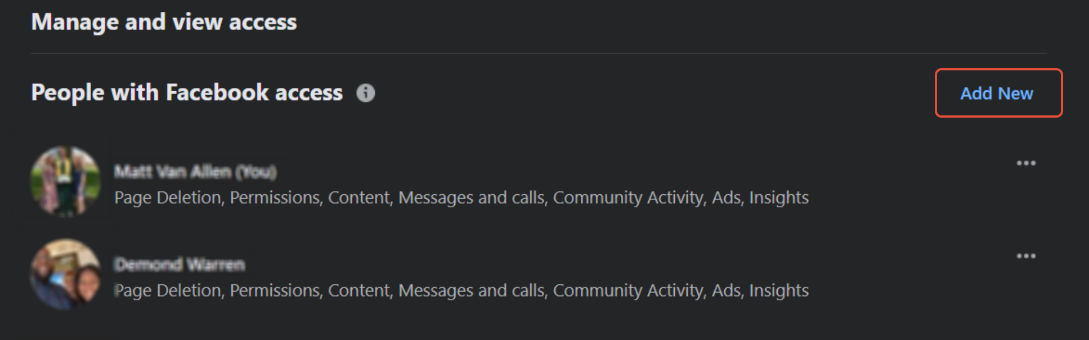
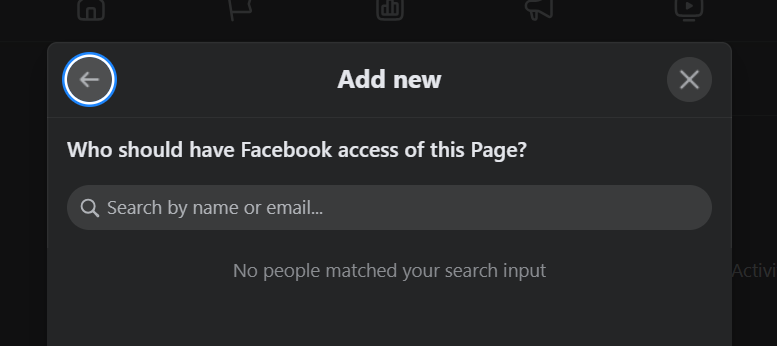
Once your primary account has been added back under Page Access, you should now be able to login to your Facebook account within the Sidearm admin under Social Media, and toggle on the Facebook pages that you have the admin rights for.
Was this article helpful?
That’s Great!
Thank you for your feedback
Sorry! We couldn't be helpful
Thank you for your feedback
Feedback sent
We appreciate your effort and will try to fix the article
